
මේ ලිපියෙන් කතා කරන්න යන්නේ Firebase එක්ක Android Studio වලින් Login Panel එකක් හදන්නේ කොහොමද කියලා. මේ වැඩේට අපිට මෙන්න මේ Prerequisites ටික අවශ්ය වෙනවා.
- Android Studio ( > 3.0 )
- අලුත් Firebase Project එකක්
- Android Studio එක ගැන පොඩි දැනුමක්
මුලින්ම බලමු මේ Firebase කියන්නේ මොකක්ද කියලා. Firebase කියන්නේ Google ලගේ දැනට අවුරුදු කිහිපයකට කලින්(2012) පටන් ගත්ත Project එකක්. මේක යොදා ගන්නේ ගොඩක් දුරට Mobile Application වලට. හැබැයි Web Application වලදි භාවිතා කරන්නත් කිසිම අවුලක් නෑ. ඒවටත් Plugins තියෙනවා දාගන්න. මූලිකවම ගත්තොත් Firebase යොදා ගන්න පුළුවන් වෙන්නේ Analytics Side එකට. හැබැයි මේකෙ තව ගොඩක් දේවල් තියෙනවා. පොඩි Idea එකක් ගන්න මේ Image එක බලන්න.

අපි මේ වැඩේදි යොදා ගන්න හදන්නේ Authentication කියන Feature එක.
Developer කෙනෙකුට Firebase වල වාසි ගොඩක් තියෙනවා. ඒ ගැන මුලින්ම බලමු මොනාද කියලා.
- Clicks කිහිපයකින් Firebase Plugin එක App එකට Attach කරගන්න පුළුවන්
- Database එක්ක ැඩ කරන්න PHP වගේ Server Side Script ලියන්න අවශ්ය වෙන්නේ නෑ
- නොමිලේ භාවිතා කරන්න පුළුවන් ( Connection 50 දක්වා )
- Facebook, Google, Twitter වගේ Services වලින් Auth කරන්න පුළුවන් Plugins Inbuilt එනවා
තවත් ගොඩක් වාසි තියෙනවා තමන්ගේ App එක Firebase එක්ක Connect කරගන්න එකෙන්. හරි මේ තමයි අපි කරන්න හදන වැඩේට අවශ්ය වටපිටාව. දැන් වැඩේට බහිමු.
මුලින්ම කරන්න ඕන Android Studio එකේ අලුත් Project එකක් හදා ගන්න එක. මම මේකට භාවිතා කරන්න යන්නේ API 22: Android 5.1 version එක. අලුතින් Project එක හදද්දි ඒකත් බලන්න. නැත්නම් XML File වල අවුල් එන්න පුුළුවන්.
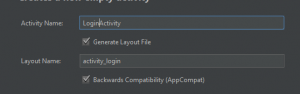
Launch Activity එක LoginActivity කියලා දාගන්න.
STEP 01
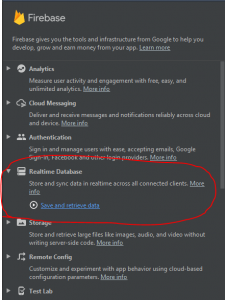
දැන් Project එක හැදිලා ඉවර වුණාම අපි App එක Firebase එක්ක Connect කරගන්න ඕන. ඒක කරන්නේ මෙහෙමයි. Android Studio එකේ උඩ තියෙන Tools Menu එකේ තියෙනවා Firebase කියලා Menu item එකක්. ඒක උඩ Click කරන්න. එහෙම කලාම දකුණු පැත්තේ අලුත් Menu එකක් Open වෙනවා. ඒකෙ තියෙනවා එක එක Services Install කරගන්න Shortcuts Link කරලා. ඒකෙන් Real time Database කියන එක Select කරගන්න. මේ වගේ.
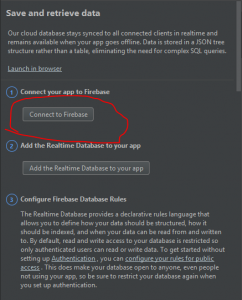
උඩ දකුණු පැත්තේ තියෙන Image එකේ විදියට Connect to Database Button එක Click කරාම අලුත් Window එකක් Open වෙනවා Firebase Console එකට. ඒකෙන් අලුත් Project එකක් හදා ගන්න පුළුවන් Firebase Console එකේ.
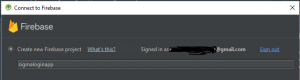
මෙතනින් කැමති නමක් දීලා Connect කරන්න. ටික වෙලාවකින් Firebase එක්ක හරියට Connect වුණා කියලා Message එකක් පෙන්නයි.
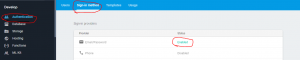
දැන් https://console.firebase.google.com එකට ගිහින් ඔයා හදපු Project එක Open කරගන්න. ඒකෙ මේ විදියට Settings Change කරගන්න.
STEP 02
ඊට පස්සේ කරන්න තියෙන්නේ Gradle Files වල පොඩි Changes කිහිපයක්. මුලින්ම root එකේ තියෙන Build.gradle එක open කරගන්න. ඒකට මේ Line 2 add කරලා sync කරගන්න.
build.gradle
dependencies {
        classpath 'com.android.tools.build:gradle:3.1.3'
        classpath 'com.google.gms:google-services:4.0.1'
    }
දැන් app folder එක ඇතුලේ තියෙන Build.gradle File එක Open කරගෙන ඒකට මේ Line ටික add කරගන්න.
app/build.gradle
dependencies {
    compile "com.google.firebase:firebase-auth:9.0.2"
}

apply plugin: 'com.google.gms.google-services'
STEP 03
දැන් අපි හදන්න යන App එකේ Interfaces වලට අවශ්ය වෙන Files ටිකක් හදා ගමු. මේ files ටික එන්න ඕන res/values කියන Path එකට.
strings.xml
<resources>
<string name="app_name">Firebase Auth</string>
<string name="action_sign_in_short">Register</string>
<string name="email">Email</string>
<string name="minimum_password">Password too short, enter minimum 6 characters!</string>
<string name="auth_failed">Authentication failed, check your email and password or sign up</string>
<string name="change_email">Change Email</string>
<string name="change_password">Change Password</string>
<string name="send_password_reset_email">Send Password reset email</string>
<string name="remove_user">Remove user</string>
<string name="new_pass">New Password</string>
<string name="title_activity_profile">Firebase</string>
<string name="title_activity_login">Sign in</string>
<string name="hint_email">Email</string>
<string name="hint_password">Password</string>
<string name="hint_name">Fullname</string>
<string name="btn_login">LOGIN</string>
<string name="btn_link_to_register">Not a member? Get registered in Firebase now!</string>
<string name="btn_link_to_login">Already registered. Login Me!</string>
<string name="title_activity_reset_password">ResetPasswordActivity</string>
<string name="btn_forgot_password">Forgot your password?</string>
<string name="btn_reset_password">Reset Password</string>
<string name="btn_back"><![CDATA[<< Back]]></string>
<string name="hint_new_email">New Email</string>
<string name="btn_change">Change</string>
<string name="btn_send">Send</string>
<string name="btn_remove">Remove</string>
<string name="btn_sign_out">Sign Out</string>
<string name="lbl_forgot_password">Forgot password?</string>
<string name="forgot_password_msg">We just need your registered Email Id to sent you password reset instructions.</string>
</resources>
colors.xml
<?xml version="1.0" encoding="utf-8"?>
<resources>
<color name="colorPrimary">#00bcd4</color>
<color name="colorPrimaryDark">#0097a7</color>
<color name="colorAccent">#f2fe71</color>

<color name="bg_login">#26ae90</color>
<color name="bg_register">#2e3237</color>
<color name="bg_main">#428bca</color>
<color name="white">#ffffff</color>
<color name="input_login">#222222</color>
<color name="input_login_hint">#999999</color>
<color name="input_register">#888888</color>
<color name="input_register_bg">#3b4148</color>
<color name="input_register_hint">#5e6266</color>
<color name="btn_login">#26ae90</color>
<color name="btn_login_bg">#eceef1</color>
<color name="lbl_name">#333333</color>
<color name="btn_logut_bg">#ff6861</color>
</resources>
dimens.xml
<resources>
<!-- Default screen margins, per the Android Design guidelines. -->
<dimen name="activity_horizontal_margin">16dp</dimen>
<dimen name="activity_vertical_margin">16dp</dimen>
<dimen name="fab_margin">16dp</dimen>
<dimen name="logo_w_h">100dp</dimen>
</resources>
Sign Up with Email & Password
උඩින් දාලා තියෙන විදියට Files ටික හදා ගත්තට පස්සේ අපි මුලින්ම කරන්න හදන්නේ අලුතින් Users ලා Register කරන Interface එකයි ඒකට අදාල Activity එකයි හදා ගන්න එක. මුලින්ම Signup Activity එක හදා ගන්න. ඒකට මේ විදියට Code කරගන්න
මේ Signup layout එක…
activity_signup.xml
<?xml version="1.0" encoding="utf-8"?>
<android.support.design.widget.CoordinatorLayout xmlns:android="http://schemas.android.com/apk/res/android"
xmlns:app="http://schemas.android.com/apk/res-auto"
xmlns:tools="http://schemas.android.com/tools"
android:layout_width="match_parent"
android:layout_height="match_parent"
android:fitsSystemWindows="true"
tools:context="info.androidhive.firebase.LoginActivity">

<LinearLayout
android:layout_width="fill_parent"
android:layout_height="fill_parent"
android:background="@color/colorPrimaryDark"
android:gravity="center"
android:orientation="vertical"
android:padding="@dimen/activity_horizontal_margin">


<ImageView
android:layout_width="@dimen/logo_w_h"
android:layout_height="@dimen/logo_w_h"
android:layout_gravity="center_horizontal"
android:layout_marginBottom="30dp"
android:src="@mipmap/ic_launcher" />

<android.support.design.widget.TextInputLayout
android:layout_width="match_parent"
android:layout_height="wrap_content">

<EditText
android:id="@+id/email"
android:layout_width="match_parent"
android:layout_height="wrap_content"
android:hint="@string/email"
android:inputType="textEmailAddress"
android:maxLines="1"
android:singleLine="true"
android:textColor="@android:color/white" />

</android.support.design.widget.TextInputLayout>

<android.support.design.widget.TextInputLayout
android:layout_width="match_parent"
android:layout_height="wrap_content">

<EditText
android:id="@+id/password"
android:layout_width="match_parent"
android:layout_height="wrap_content"
android:focusableInTouchMode="true"
android:hint="@string/hint_password"
android:imeActionId="@+id/login"
android:imeOptions="actionUnspecified"
android:inputType="textPassword"
android:maxLines="1"
android:singleLine="true"
android:textColor="@android:color/white" />

</android.support.design.widget.TextInputLayout>

<Button
android:id="@+id/sign_up_button"
style="?android:textAppearanceSmall"
android:layout_width="match_parent"
android:layout_height="wrap_content"
android:layout_marginTop="16dp"
android:background="@color/colorAccent"
android:text="@string/action_sign_in_short"
android:textColor="@android:color/black"
android:textStyle="bold" />

<Button
android:id="@+id/btn_reset_password"
android:layout_width="fill_parent"
android:layout_height="wrap_content"
android:layout_marginTop="20dip"
android:background="@null"
android:text="@string/btn_forgot_password"
android:textAllCaps="false"
android:textColor="@color/colorAccent" />

<!-- Link to Login Screen -->

<Button
android:id="@+id/sign_in_button"
android:layout_width="fill_parent"
android:layout_height="wrap_content"
android:layout_marginTop="20dip"
android:background="@null"
android:text="@string/btn_link_to_login"
android:textAllCaps="false"
android:textColor="@color/white"
android:textSize="15dp" />
</LinearLayout>

<ProgressBar
android:id="@+id/progressBar"
android:layout_width="30dp"
android:layout_height="30dp"
android:layout_gravity="center|bottom"
android:layout_marginBottom="20dp"
android:visibility="gone" />
</android.support.design.widget.CoordinatorLayout>
දැන් අලුත් SignupActivity කියලා File එකක් හදා ගන්න. ඒකෙ මේ Code එක දාගන්න.
SignupActivity.java
package info.androidhive.firebase;

import android.content.Intent;
import android.os.Bundle;
import android.support.annotation.NonNull;
import android.support.v7.app.AppCompatActivity;
import android.text.TextUtils;
import android.view.View;
import android.widget.Button;
import android.widget.EditText;
import android.widget.ProgressBar;
import android.widget.Toast;

import com.google.android.gms.tasks.OnCompleteListener;
import com.google.android.gms.tasks.Task;
import com.google.firebase.auth.AuthResult;
import com.google.firebase.auth.FirebaseAuth;

public class SignupActivity extends AppCompatActivity {

    private EditText inputEmail, inputPassword;
    private Button btnSignIn, btnSignUp, btnResetPassword;
    private ProgressBar progressBar;
    private FirebaseAuth auth;

    @Override
    protected void onCreate(Bundle savedInstanceState) {
        super.onCreate(savedInstanceState);
        setContentView(R.layout.activity_signup);

        //Get Firebase auth instance
        auth = FirebaseAuth.getInstance();

        btnSignIn = (Button) findViewById(R.id.sign_in_button);
        btnSignUp = (Button) findViewById(R.id.sign_up_button);
        inputEmail = (EditText) findViewById(R.id.email);
        inputPassword = (EditText) findViewById(R.id.password);
        progressBar = (ProgressBar) findViewById(R.id.progressBar);
        btnResetPassword = (Button) findViewById(R.id.btn_reset_password);

        btnResetPassword.setOnClickListener(new View.OnClickListener() {
            @Override
            public void onClick(View v) {
                startActivity(new Intent(SignupActivity.this, ResetPasswordActivity.class));
            }
        });

        btnSignIn.setOnClickListener(new View.OnClickListener() {
            @Override
            public void onClick(View v) {
                finish();
            }
        });

        btnSignUp.setOnClickListener(new View.OnClickListener() {
            @Override
            public void onClick(View v) {

                String email = inputEmail.getText().toString().trim();
                String password = inputPassword.getText().toString().trim();

                if (TextUtils.isEmpty(email)) {
                    Toast.makeText(getApplicationContext(), "Enter email address!", Toast.LENGTH_SHORT).show();
                    return;
                }

                if (TextUtils.isEmpty(password)) {
                    Toast.makeText(getApplicationContext(), "Enter password!", Toast.LENGTH_SHORT).show();
                    return;
                }

                if (password.length() < 6) {
                    Toast.makeText(getApplicationContext(), "Password too short, enter minimum 6 characters!", Toast.LENGTH_SHORT).show();
                    return;
                }

                progressBar.setVisibility(View.VISIBLE);
                //create user
                auth.createUserWithEmailAndPassword(email, password)
                        .addOnCompleteListener(SignupActivity.this, new OnCompleteListener() {
                            @Override
                            public void onComplete(@NonNull Task task) {
                                Toast.makeText(SignupActivity.this, "createUserWithEmail:onComplete:" + task.isSuccessful(), Toast.LENGTH_SHORT).show();
                                progressBar.setVisibility(View.GONE);
                                // If sign in fails, display a message to the user. If sign in succeeds
                                // the auth state listener will be notified and logic to handle the
                                // signed in user can be handled in the listener.
                                if (!task.isSuccessful()) {
                                    Toast.makeText(SignupActivity.this, "Authentication failed." + task.getException(),
                                            Toast.LENGTH_SHORT).show();
                                } else {
                                    startActivity(new Intent(SignupActivity.this, MainActivity.class));
                                    finish();
                                }
                            }
                        });

            }
        });
    }

    @Override
    protected void onResume() {
        super.onResume();
        progressBar.setVisibility(View.GONE);
    }
}
මේ XML file එකෙන් Users ලට Signup වෙන්න මේ වගේ Interface එකක් හැදෙනවා.
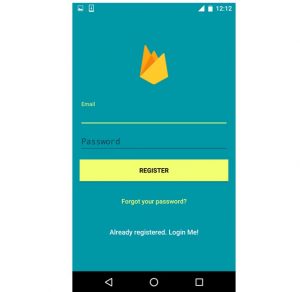
හැබැයි මේ Interface එක අපිට test කරන්න විදියක් නෑ තාම. මොකද අපේ Start Activity එක හදලා තියෙන්නේ Login Activity එකට නිසා. අපි දැන් අපේ Login Activity එක හදලා ඒකෙන් Signup Activity එකට Link එකක් හදා ගමු.
Log In with Email & Password
මේ තියෙන්නේ activity_login.xml එකේ Source Code එක.
activity_login.xml
<?xml version="1.0" encoding="utf-8"?>
<android.support.design.widget.CoordinatorLayout xmlns:android="http://schemas.android.com/apk/res/android"
xmlns:app="http://schemas.android.com/apk/res-auto"
xmlns:tools="http://schemas.android.com/tools"
android:layout_width="match_parent"
android:layout_height="match_parent"
android:fitsSystemWindows="true"
tools:context="info.androidhive.firebase.LoginActivity">

<LinearLayout
android:layout_width="fill_parent"
android:layout_height="fill_parent"
android:background="@color/colorPrimary"
android:gravity="center"
android:orientation="vertical"
android:padding="@dimen/activity_horizontal_margin">


<ImageView
android:layout_width="@dimen/logo_w_h"
android:layout_height="@dimen/logo_w_h"
android:layout_gravity="center_horizontal"
android:layout_marginBottom="30dp"
android:src="@mipmap/ic_launcher" />

<android.support.design.widget.TextInputLayout
android:layout_width="match_parent"
android:layout_height="wrap_content">

<EditText
android:id="@+id/email"
android:layout_width="match_parent"
android:layout_height="wrap_content"
android:layout_marginBottom="10dp"
android:hint="@string/hint_email"
android:inputType="textEmailAddress"
android:textColor="@android:color/white"
android:textColorHint="@android:color/white" />
</android.support.design.widget.TextInputLayout>

<android.support.design.widget.TextInputLayout
android:layout_width="match_parent"
android:layout_height="wrap_content">

<EditText
android:id="@+id/password"
android:layout_width="fill_parent"
android:layout_height="wrap_content"
android:layout_marginBottom="10dp"
android:hint="@string/hint_password"
android:inputType="textPassword"
android:textColor="@android:color/white"
android:textColorHint="@android:color/white" />
</android.support.design.widget.TextInputLayout>

<!-- Login Button -->

<Button
android:id="@+id/btn_login"
android:layout_width="fill_parent"
android:layout_height="wrap_content"
android:layout_marginTop="20dip"
android:background="@color/colorAccent"
android:text="@string/btn_login"
android:textColor="@android:color/black" />

<Button
android:id="@+id/btn_reset_password"
android:layout_width="fill_parent"
android:layout_height="wrap_content"
android:layout_marginTop="20dip"
android:background="@null"
android:text="@string/btn_forgot_password"
android:textAllCaps="false"
android:textColor="@color/colorAccent" />

<!-- Link to Login Screen -->

<Button
android:id="@+id/btn_signup"
android:layout_width="fill_parent"
android:layout_height="wrap_content"
android:layout_marginTop="20dip"
android:background="@null"
android:text="@string/btn_link_to_register"
android:textAllCaps="false"
android:textColor="@color/white"
android:textSize="15dp" />
</LinearLayout>

<ProgressBar
android:id="@+id/progressBar"
android:layout_width="30dp"
android:layout_height="30dp"
android:layout_gravity="center|bottom"
android:layout_marginBottom="20dp"
android:visibility="gone" />
</android.support.design.widget.CoordinatorLayout>
Firebase Console එකෙන් අපිට පුළුවන් සරලවම signInWithEmailAndPassword() කියන Function එක call කරලා User කෙනෙක් Sing in කරවන්න. ඒකට අදාල Activity එක මේ විදියට ලියා ගන්න පුළුවන්.
LoginActivity.java
package info.androidhive.firebase;

import android.content.Intent;
import android.os.Bundle;
import android.support.annotation.NonNull;
import android.support.v7.app.AppCompatActivity;
import android.support.v7.widget.Toolbar;
import android.text.TextUtils;
import android.view.View;
import android.widget.Button;
import android.widget.EditText;
import android.widget.ProgressBar;
import android.widget.Toast;

import com.google.android.gms.tasks.OnCompleteListener;
import com.google.android.gms.tasks.Task;
import com.google.firebase.auth.AuthResult;
import com.google.firebase.auth.FirebaseAuth;

public class LoginActivity extends AppCompatActivity {

    private EditText inputEmail, inputPassword;
    private FirebaseAuth auth;
    private ProgressBar progressBar;
    private Button btnSignup, btnLogin, btnReset;

    @Override
    protected void onCreate(Bundle savedInstanceState) {
        super.onCreate(savedInstanceState);

        //Get Firebase auth instance
        auth = FirebaseAuth.getInstance();

        if (auth.getCurrentUser() != null) {
            startActivity(new Intent(LoginActivity.this, MainActivity.class));
            finish();
        }

        // set the view now
        setContentView(R.layout.activity_login);

        Toolbar toolbar = (Toolbar) findViewById(R.id.toolbar);
        setSupportActionBar(toolbar);

        inputEmail = (EditText) findViewById(R.id.email);
        inputPassword = (EditText) findViewById(R.id.password);
        progressBar = (ProgressBar) findViewById(R.id.progressBar);
        btnSignup = (Button) findViewById(R.id.btn_signup);
        btnLogin = (Button) findViewById(R.id.btn_login);
        btnReset = (Button) findViewById(R.id.btn_reset_password);

        //Get Firebase auth instance
        auth = FirebaseAuth.getInstance();

        btnSignup.setOnClickListener(new View.OnClickListener() {
            @Override
            public void onClick(View v) {
                startActivity(new Intent(LoginActivity.this, SignupActivity.class));
            }
        });

        btnReset.setOnClickListener(new View.OnClickListener() {
            @Override
            public void onClick(View v) {
                startActivity(new Intent(LoginActivity.this, ResetPasswordActivity.class));
            }
        });

        btnLogin.setOnClickListener(new View.OnClickListener() {
            @Override
            public void onClick(View v) {
                String email = inputEmail.getText().toString();
                final String password = inputPassword.getText().toString();

                if (TextUtils.isEmpty(email)) {
                    Toast.makeText(getApplicationContext(), "Enter email address!", Toast.LENGTH_SHORT).show();
                    return;
                }

                if (TextUtils.isEmpty(password)) {
                    Toast.makeText(getApplicationContext(), "Enter password!", Toast.LENGTH_SHORT).show();
                    return;
                }

                progressBar.setVisibility(View.VISIBLE);

                //authenticate user
                auth.signInWithEmailAndPassword(email, password)
                        .addOnCompleteListener(LoginActivity.this, new OnCompleteListener() {
                            @Override
                            public void onComplete(@NonNull Task task) {
                                // If sign in fails, display a message to the user. If sign in succeeds
                                // the auth state listener will be notified and logic to handle the
                                // signed in user can be handled in the listener.
                                progressBar.setVisibility(View.GONE);
                                if (!task.isSuccessful()) {
                                    // there was an error
                                    if (password.length() < 6) {
                                        inputPassword.setError(getString(R.string.minimum_password));
                                    } else {
                                        Toast.makeText(LoginActivity.this, getString(R.string.auth_failed), Toast.LENGTH_LONG).show();
                                    }
                                } else {
                                    Intent intent = new Intent(LoginActivity.this, MainActivity.class);
                                    startActivity(intent);
                                    finish();
                                }
                            }
                        });
            }
        });
    }
}
මේකෙන් අපිට මේ වගේ Interface එකක් හදා ගන්න පුළුවන් වෙනවා..
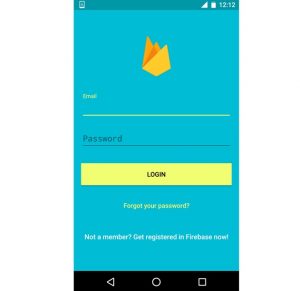
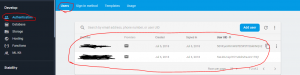
දැන් App එක run කරලා බලන්න Errors තියෙනවද කියලා. Signup වෙලා බලන්න හරියට Register වෙනවද කියලා. ඒක Firebase Console එකේ මේ විදියට බලන්න පුළුවන්.
ඊළඟට බලමු කොහොමද Password Reset Email එකක් යවන්නේ කියලා..
Forgot Password – Send Reset Password Email
මේකට අලුත් File 2ක් හදා ගන්න ඕන. ResetPasswordActivity.java , activity_reset_password.xml File 2 හදා ගන්න.
activity_reset_password.xml
<?xml version="1.0" encoding="utf-8"?>
<android.support.design.widget.CoordinatorLayout xmlns:android="http://schemas.android.com/apk/res/android"
xmlns:app="http://schemas.android.com/apk/res-auto"
xmlns:tools="http://schemas.android.com/tools"
android:layout_width="match_parent"
android:layout_height="match_parent"
android:layout_gravity="center"
android:background="@color/colorPrimary"
android:fitsSystemWindows="true"
tools:context="info.androidhive.firebase.LoginActivity">

<LinearLayout
android:layout_width="fill_parent"
android:layout_height="wrap_content"
android:layout_marginTop="30dp"
android:gravity="center"
android:orientation="vertical"
android:padding="@dimen/activity_horizontal_margin">


<ImageView
android:layout_width="@dimen/logo_w_h"
android:layout_height="@dimen/logo_w_h"
android:layout_gravity="center_horizontal"
android:layout_marginBottom="10dp"
android:src="@mipmap/ic_launcher" />

<TextView
android:layout_width="wrap_content"
android:layout_height="wrap_content"
android:layout_gravity="center_horizontal"
android:padding="10dp"
android:text="@string/lbl_forgot_password"
android:textColor="@android:color/white"
android:textSize="20dp" />

<TextView
android:layout_width="wrap_content"
android:layout_height="wrap_content"
android:layout_marginBottom="10dp"
android:gravity="center_horizontal"
android:padding="@dimen/activity_horizontal_margin"
android:text="@string/forgot_password_msg"
android:textColor="@android:color/white"
android:textSize="14dp" />

<android.support.design.widget.TextInputLayout
android:layout_width="match_parent"
android:layout_height="wrap_content">

<EditText
android:id="@+id/email"
android:layout_width="match_parent"
android:layout_height="wrap_content"
android:layout_marginBottom="10dp"
android:layout_marginTop="20dp"
android:hint="@string/hint_email"
android:inputType="textEmailAddress"
android:textColor="@android:color/white"
android:textColorHint="@android:color/white" />
</android.support.design.widget.TextInputLayout>

<!-- Login Button -->

<Button
android:id="@+id/btn_reset_password"
android:layout_width="fill_parent"
android:layout_height="wrap_content"
android:layout_marginTop="20dip"
android:background="@color/colorAccent"
android:text="@string/btn_reset_password"
android:textColor="@android:color/black" />

<Button
android:id="@+id/btn_back"
android:layout_width="wrap_content"
android:layout_height="wrap_content"
android:layout_marginTop="10dp"
android:background="@null"
android:text="@string/btn_back"
android:textColor="@color/colorAccent" />

</LinearLayout>

<ProgressBar
android:id="@+id/progressBar"
android:layout_width="30dp"
android:layout_height="30dp"
android:layout_gravity="center|bottom"
android:layout_marginBottom="20dp"
android:visibility="gone" />
</android.support.design.widget.CoordinatorLayout>
ResetPasswordActivity.java
package info.androidhive.firebase;

import android.os.Bundle;
import android.support.annotation.NonNull;
import android.support.v7.app.AppCompatActivity;
import android.text.TextUtils;
import android.view.View;
import android.widget.Button;
import android.widget.EditText;
import android.widget.ProgressBar;
import android.widget.Toast;

import com.google.android.gms.tasks.OnCompleteListener;
import com.google.android.gms.tasks.Task;
import com.google.firebase.auth.FirebaseAuth;

public class ResetPasswordActivity extends AppCompatActivity {

    private EditText inputEmail;
    private Button btnReset, btnBack;
    private FirebaseAuth auth;
    private ProgressBar progressBar;

    @Override
    protected void onCreate(Bundle savedInstanceState) {
        super.onCreate(savedInstanceState);
        setContentView(R.layout.activity_reset_password);

        inputEmail = (EditText) findViewById(R.id.email);
        btnReset = (Button) findViewById(R.id.btn_reset_password);
        btnBack = (Button) findViewById(R.id.btn_back);
        progressBar = (ProgressBar) findViewById(R.id.progressBar);

        auth = FirebaseAuth.getInstance();

        btnBack.setOnClickListener(new View.OnClickListener() {
            @Override
            public void onClick(View v) {
                finish();
            }
        });

        btnReset.setOnClickListener(new View.OnClickListener() {
            @Override
            public void onClick(View v) {

                String email = inputEmail.getText().toString().trim();

                if (TextUtils.isEmpty(email)) {
                    Toast.makeText(getApplication(), "Enter your registered email id", Toast.LENGTH_SHORT).show();
                    return;
                }

                progressBar.setVisibility(View.VISIBLE);
                auth.sendPasswordResetEmail(email)
                        .addOnCompleteListener(new OnCompleteListener() {
                            @Override
                            public void onComplete(@NonNull Task task) {
                                if (task.isSuccessful()) {
                                    Toast.makeText(ResetPasswordActivity.this, "We have sent you instructions to reset your password!", Toast.LENGTH_SHORT).show();
                                } else {
                                    Toast.makeText(ResetPasswordActivity.this, "Failed to send reset email!", Toast.LENGTH_SHORT).show();
                                }

                                progressBar.setVisibility(View.GONE);
                            }
                        });
            }
        });
    }

}
ඒකෙන් මේ වගේ Interface එකක් හැදෙනවා.
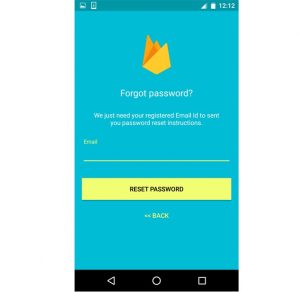
දැන් App එක run කරලා බලන්න දැන්ට Register වෙලා ඉන්න Email එකක් දීලා Password Reset Mail එකක් එනවද කියලා. මේ විදියේ Email එකක් එන්නේ.
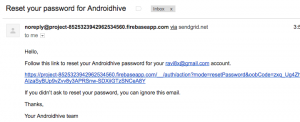
දැන් අපේ මූලික ආකෘතිය හදාගෙන ඉවරයි. අපිට ඕන නම් මීට අමතරව Profile Page එකක් හදා ගන්න පුළුවන්. එක එක Function කිහිපයක්ම තියෙනවා Firebase එක්ක ලේසියෙන් කරගන්න පුළුවන්. ඒවායින් කිහිපයක් මේ විදියට හදා ගන්න පුළුවන්.
Checking User Session
auth = FirebaseAuth.getInstance();
        if (auth.getCurrentUser() != null) {
            // User is logged in
        }
Change Password
FirebaseUser user = FirebaseAuth.getInstance().getCurrentUser();

user.updatePassword(newPassword.getText().toString().trim())
            .addOnCompleteListener(new OnCompleteListener() {
        @Override
        public void onComplete(@NonNull Task task) {
            if (task.isSuccessful()) {
                Toast.makeText(MainActivity.this, "Password is updated!", Toast.LENGTH_SHORT).show();
            } else {
                Toast.makeText(MainActivity.this, "Failed to update password!", Toast.LENGTH_SHORT).show();
                progressBar.setVisibility(View.GONE);
            }
        }
    });
Change Email
FirebaseUser user = FirebaseAuth.getInstance().getCurrentUser();

user.updateEmail(newEmail.getText().toString().trim())
            .addOnCompleteListener(new OnCompleteListener() {
        @Override
        public void onComplete(@NonNull Task task) {
            if (task.isSuccessful()) {
                Toast.makeText(MainActivity.this, "Email address is updated.", Toast.LENGTH_LONG).show();
            } else {
                Toast.makeText(MainActivity.this, "Failed to update email!", Toast.LENGTH_LONG).show();
            }
        }
    });
Deleting Account / User
FirebaseUser user = FirebaseAuth.getInstance().getCurrentUser();
if (user != null) {
        user.delete()
                .addOnCompleteListener(new OnCompleteListener() {
                    @Override
                    public void onComplete(@NonNull Task task) {
                        if (task.isSuccessful()) {
                            Toast.makeText(MainActivity.this, "Your profile is deleted:( Create a account now!", Toast.LENGTH_SHORT).show();
                        } else {
                            Toast.makeText(MainActivity.this, "Failed to delete your account!", Toast.LENGTH_SHORT).show();
                        }
                    }
                });
    }
Sign Out
auth.signOut();

// this listener will be called when there is change in firebase user session
FirebaseAuth.AuthStateListener authListener = new FirebaseAuth.AuthStateListener() {
            @Override
            public void onAuthStateChanged(@NonNull FirebaseAuth firebaseAuth) {
                FirebaseUser user = firebaseAuth.getCurrentUser();
                if (user == null) {
                    // user auth state is changed - user is null
                    // launch login activity
                    startActivity(new Intent(MainActivity.this, LoginActivity.class));
                    finish();
                }
            }
        };
මේ Functions ඔක්කොම එකට එකතු කරලා අපිට පුළුවන් Profile Page එක හදා ගන්න. ඒක අපි ActivityMain එකේ හදමු. ඒක මේ විදියට Code කරගන්න.
activity_main.xml
<?xml version="1.0" encoding="utf-8"?>
<android.support.design.widget.CoordinatorLayout xmlns:android="http://schemas.android.com/apk/res/android"
xmlns:app="http://schemas.android.com/apk/res-auto"
xmlns:tools="http://schemas.android.com/tools"
android:layout_width="match_parent"
android:layout_height="match_parent"
android:fitsSystemWindows="true"
tools:context=".MainActivity">

<android.support.design.widget.AppBarLayout
android:layout_width="match_parent"
android:layout_height="wrap_content"
android:theme="@style/AppTheme.AppBarOverlay"
app:elevation="0dp">

<android.support.v7.widget.Toolbar
android:id="@+id/toolbar"
android:layout_width="match_parent"
android:layout_height="?attr/actionBarSize"
android:background="?attr/colorPrimaryDark"
app:layout_scrollFlags="scroll|enterAlways"
app:popupTheme="@style/AppTheme.PopupOverlay" />

</android.support.design.widget.AppBarLayout>

<LinearLayout
android:layout_width="match_parent"
android:layout_height="wrap_content"
android:orientation="vertical"
android:paddingBottom="@dimen/activity_vertical_margin"
android:paddingLeft="@dimen/activity_horizontal_margin"
android:paddingRight="@dimen/activity_horizontal_margin"
android:paddingTop="@dimen/activity_vertical_margin"
app:layout_behavior="@string/appbar_scrolling_view_behavior">

<EditText
android:id="@+id/old_email"
android:layout_width="match_parent"
android:layout_height="wrap_content"
android:hint="@string/hint_email"
android:inputType="textEmailAddress"
android:maxLines="1"
android:singleLine="true" />

<EditText
android:id="@+id/new_email"
android:layout_width="match_parent"
android:layout_height="wrap_content"
android:hint="@string/hint_new_email"
android:inputType="textEmailAddress"
android:maxLines="1"
android:singleLine="true" />

<EditText
android:id="@+id/password"
android:layout_width="match_parent"
android:layout_height="wrap_content"
android:focusableInTouchMode="true"
android:hint="@string/prompt_password"
android:imeActionId="@+id/login"
android:imeOptions="actionUnspecified"
android:inputType="textPassword"
android:maxLines="1"
android:singleLine="true" />

<EditText
android:id="@+id/newPassword"
android:layout_width="match_parent"
android:layout_height="wrap_content"
android:focusableInTouchMode="true"
android:hint="@string/new_pass"
android:imeActionId="@+id/login"
android:imeOptions="actionUnspecified"
android:inputType="textPassword"
android:maxLines="1"
android:singleLine="true" />

<Button
android:id="@+id/changeEmail"
style="?android:textAppearanceSmall"
android:layout_width="wrap_content"
android:layout_height="wrap_content"
android:layout_marginTop="16dp"
android:background="@color/colorPrimaryDark"
android:text="@string/btn_change"
android:textColor="@android:color/white"
android:textStyle="bold" />

<Button
android:id="@+id/changePass"
style="?android:textAppearanceSmall"
android:layout_width="wrap_content"
android:layout_height="wrap_content"
android:layout_marginTop="16dp"
android:background="@color/colorPrimaryDark"
android:text="@string/btn_change"
android:textColor="@android:color/white"
android:textStyle="bold" />

<Button
android:id="@+id/send"
style="?android:textAppearanceSmall"
android:layout_width="wrap_content"
android:layout_height="wrap_content"
android:layout_marginTop="16dp"
android:background="@color/colorPrimaryDark"
android:text="@string/btn_send"
android:textColor="@android:color/white"
android:textStyle="bold" />

<ProgressBar
android:id="@+id/progressBar"
android:layout_width="30dp"
android:layout_height="30dp"
android:visibility="gone" />

<Button
android:id="@+id/remove"
style="?android:textAppearanceSmall"
android:layout_width="wrap_content"
android:layout_height="wrap_content"
android:layout_marginTop="16dp"
android:background="@color/colorPrimaryDark"
android:text="@string/btn_remove"
android:textColor="@android:color/white"
android:textStyle="bold" />

<Button
android:id="@+id/change_email_button"
style="?android:textAppearanceSmall"
android:layout_width="match_parent"
android:layout_height="wrap_content"
android:layout_marginTop="16dp"
android:text="@string/change_email"
android:textStyle="bold" />

<Button
android:id="@+id/change_password_button"
style="?android:textAppearanceSmall"
android:layout_width="match_parent"
android:layout_height="wrap_content"
android:layout_marginTop="16dp"
android:text="@string/change_password"
android:textStyle="bold" />

<Button
android:id="@+id/sending_pass_reset_button"
style="?android:textAppearanceSmall"
android:layout_width="match_parent"
android:layout_height="wrap_content"
android:layout_marginTop="16dp"
android:text="@string/send_password_reset_email"
android:textStyle="bold" />

<Button
android:id="@+id/remove_user_button"
style="?android:textAppearanceSmall"
android:layout_width="match_parent"
android:layout_height="wrap_content"
android:layout_marginTop="16dp"
android:text="@string/remove_user"
android:textStyle="bold" />

<Button
android:id="@+id/sign_out"
style="?android:textAppearanceSmall"
android:layout_width="match_parent"
android:layout_height="wrap_content"
android:layout_marginTop="16dp"
android:background="@color/colorPrimary"
android:text="@string/btn_sign_out"
android:textColor="@android:color/white"
android:textStyle="bold" />

</LinearLayout>

</android.support.design.widget.CoordinatorLayout>
MainActivity.java
package info.androidhive.firebase;

import android.content.Intent;
import android.os.Bundle;
import android.support.annotation.NonNull;
import android.support.v7.app.AppCompatActivity;
import android.support.v7.widget.Toolbar;
import android.view.View;
import android.widget.Button;
import android.widget.EditText;
import android.widget.ProgressBar;
import android.widget.Toast;

import com.google.android.gms.tasks.OnCompleteListener;
import com.google.android.gms.tasks.Task;
import com.google.firebase.auth.FirebaseAuth;
import com.google.firebase.auth.FirebaseUser;

public class MainActivity extends AppCompatActivity {

    private Button btnChangeEmail, btnChangePassword, btnSendResetEmail, btnRemoveUser,
            changeEmail, changePassword, sendEmail, remove, signOut;

    private EditText oldEmail, newEmail, password, newPassword;
    private ProgressBar progressBar;
    private FirebaseAuth.AuthStateListener authListener;
    private FirebaseAuth auth;

    @Override
    protected void onCreate(Bundle savedInstanceState) {
        super.onCreate(savedInstanceState);
        setContentView(R.layout.activity_main);

        Toolbar toolbar = (Toolbar) findViewById(R.id.toolbar);
        toolbar.setTitle(getString(R.string.app_name));
        setSupportActionBar(toolbar);

        //get firebase auth instance
        auth = FirebaseAuth.getInstance();

        //get current user
        final FirebaseUser user = FirebaseAuth.getInstance().getCurrentUser();

        authListener = new FirebaseAuth.AuthStateListener() {
            @Override
            public void onAuthStateChanged(@NonNull FirebaseAuth firebaseAuth) {
                FirebaseUser user = firebaseAuth.getCurrentUser();
                if (user == null) {
                    // user auth state is changed - user is null
                    // launch login activity
                    startActivity(new Intent(MainActivity.this, LoginActivity.class));
                    finish();
                }
            }
        };

        btnChangeEmail = (Button) findViewById(R.id.change_email_button);
        btnChangePassword = (Button) findViewById(R.id.change_password_button);
        btnSendResetEmail = (Button) findViewById(R.id.sending_pass_reset_button);
        btnRemoveUser = (Button) findViewById(R.id.remove_user_button);
        changeEmail = (Button) findViewById(R.id.changeEmail);
        changePassword = (Button) findViewById(R.id.changePass);
        sendEmail = (Button) findViewById(R.id.send);
        remove = (Button) findViewById(R.id.remove);
        signOut = (Button) findViewById(R.id.sign_out);

        oldEmail = (EditText) findViewById(R.id.old_email);
        newEmail = (EditText) findViewById(R.id.new_email);
        password = (EditText) findViewById(R.id.password);
        newPassword = (EditText) findViewById(R.id.newPassword);

        oldEmail.setVisibility(View.GONE);
        newEmail.setVisibility(View.GONE);
        password.setVisibility(View.GONE);
        newPassword.setVisibility(View.GONE);
        changeEmail.setVisibility(View.GONE);
        changePassword.setVisibility(View.GONE);
        sendEmail.setVisibility(View.GONE);
        remove.setVisibility(View.GONE);

        progressBar = (ProgressBar) findViewById(R.id.progressBar);

        if (progressBar != null) {
            progressBar.setVisibility(View.GONE);
        }

        btnChangeEmail.setOnClickListener(new View.OnClickListener() {
            @Override
            public void onClick(View v) {
                oldEmail.setVisibility(View.GONE);
                newEmail.setVisibility(View.VISIBLE);
                password.setVisibility(View.GONE);
                newPassword.setVisibility(View.GONE);
                changeEmail.setVisibility(View.VISIBLE);
                changePassword.setVisibility(View.GONE);
                sendEmail.setVisibility(View.GONE);
                remove.setVisibility(View.GONE);
            }
        });

        changeEmail.setOnClickListener(new View.OnClickListener() {
            @Override
            public void onClick(View v) {
                progressBar.setVisibility(View.VISIBLE);
                if (user != null && !newEmail.getText().toString().trim().equals("")) {
                    user.updateEmail(newEmail.getText().toString().trim())
                            .addOnCompleteListener(new OnCompleteListener() {
                                @Override
                                public void onComplete(@NonNull Task task) {
                                    if (task.isSuccessful()) {
                                        Toast.makeText(MainActivity.this, "Email address is updated. Please sign in with new email id!", Toast.LENGTH_LONG).show();
                                        signOut();
                                        progressBar.setVisibility(View.GONE);
                                    } else {
                                        Toast.makeText(MainActivity.this, "Failed to update email!", Toast.LENGTH_LONG).show();
                                        progressBar.setVisibility(View.GONE);
                                    }
                                }
                            });
                } else if (newEmail.getText().toString().trim().equals("")) {
                    newEmail.setError("Enter email");
                    progressBar.setVisibility(View.GONE);
                }
            }
        });

        btnChangePassword.setOnClickListener(new View.OnClickListener() {
            @Override
            public void onClick(View v) {
                oldEmail.setVisibility(View.GONE);
                newEmail.setVisibility(View.GONE);
                password.setVisibility(View.GONE);
                newPassword.setVisibility(View.VISIBLE);
                changeEmail.setVisibility(View.GONE);
                changePassword.setVisibility(View.VISIBLE);
                sendEmail.setVisibility(View.GONE);
                remove.setVisibility(View.GONE);
            }
        });

        changePassword.setOnClickListener(new View.OnClickListener() {
            @Override
            public void onClick(View v) {
                progressBar.setVisibility(View.VISIBLE);
                if (user != null && !newPassword.getText().toString().trim().equals("")) {
                    if (newPassword.getText().toString().trim().length() < 6) {
                        newPassword.setError("Password too short, enter minimum 6 characters");
                        progressBar.setVisibility(View.GONE);
                    } else {
                        user.updatePassword(newPassword.getText().toString().trim())
                                .addOnCompleteListener(new OnCompleteListener() {
                                    @Override
                                    public void onComplete(@NonNull Task task) {
                                        if (task.isSuccessful()) {
                                            Toast.makeText(MainActivity.this, "Password is updated, sign in with new password!", Toast.LENGTH_SHORT).show();
                                            signOut();
                                            progressBar.setVisibility(View.GONE);
                                        } else {
                                            Toast.makeText(MainActivity.this, "Failed to update password!", Toast.LENGTH_SHORT).show();
                                            progressBar.setVisibility(View.GONE);
                                        }
                                    }
                                });
                    }
                } else if (newPassword.getText().toString().trim().equals("")) {
                    newPassword.setError("Enter password");
                    progressBar.setVisibility(View.GONE);
                }
            }
        });

        btnSendResetEmail.setOnClickListener(new View.OnClickListener() {
            @Override
            public void onClick(View v) {
                oldEmail.setVisibility(View.VISIBLE);
                newEmail.setVisibility(View.GONE);
                password.setVisibility(View.GONE);
                newPassword.setVisibility(View.GONE);
                changeEmail.setVisibility(View.GONE);
                changePassword.setVisibility(View.GONE);
                sendEmail.setVisibility(View.VISIBLE);
                remove.setVisibility(View.GONE);
            }
        });

        sendEmail.setOnClickListener(new View.OnClickListener() {
            @Override
            public void onClick(View v) {
                progressBar.setVisibility(View.VISIBLE);
                if (!oldEmail.getText().toString().trim().equals("")) {
                    auth.sendPasswordResetEmail(oldEmail.getText().toString().trim())
                            .addOnCompleteListener(new OnCompleteListener() {
                                @Override
                                public void onComplete(@NonNull Task task) {
                                    if (task.isSuccessful()) {
                                        Toast.makeText(MainActivity.this, "Reset password email is sent!", Toast.LENGTH_SHORT).show();
                                        progressBar.setVisibility(View.GONE);
                                    } else {
                                        Toast.makeText(MainActivity.this, "Failed to send reset email!", Toast.LENGTH_SHORT).show();
                                        progressBar.setVisibility(View.GONE);
                                    }
                                }
                            });
                } else {
                    oldEmail.setError("Enter email");
                    progressBar.setVisibility(View.GONE);
                }
            }
        });

        btnRemoveUser.setOnClickListener(new View.OnClickListener() {
            @Override
            public void onClick(View v) {
                progressBar.setVisibility(View.VISIBLE);
                if (user != null) {
                    user.delete()
                            .addOnCompleteListener(new OnCompleteListener() {
                                @Override
                                public void onComplete(@NonNull Task task) {
                                    if (task.isSuccessful()) {
                                        Toast.makeText(MainActivity.this, "Your profile is deleted:( Create a account now!", Toast.LENGTH_SHORT).show();
                                        startActivity(new Intent(MainActivity.this, SignupActivity.class));
                                        finish();
                                        progressBar.setVisibility(View.GONE);
                                    } else {
                                        Toast.makeText(MainActivity.this, "Failed to delete your account!", Toast.LENGTH_SHORT).show();
                                        progressBar.setVisibility(View.GONE);
                                    }
                                }
                            });
                }
            }
        });

        signOut.setOnClickListener(new View.OnClickListener() {
            @Override
            public void onClick(View v) {
                signOut();
            }
        });

    }

    //sign out method
    public void signOut() {
        auth.signOut();
    }

    @Override
    protected void onResume() {
        super.onResume();
        progressBar.setVisibility(View.GONE);
    }

    @Override
    public void onStart() {
        super.onStart();
        auth.addAuthStateListener(authListener);
    }

    @Override
    public void onStop() {
        super.onStop();
        if (authListener != null) {
            auth.removeAuthStateListener(authListener);
        }
    }
}
මේ වගේ Interface එකක් මේ xml එකෙන් හදා ගන්න පුළුවන්.
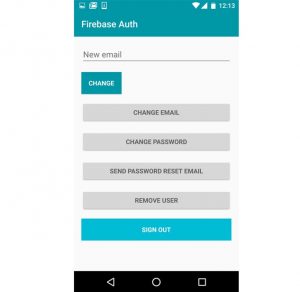
අලුත් ලිපියකින් හමු වෙමු …….